
Summary
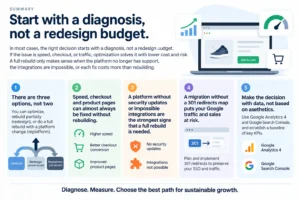
In most cases, the decision should start with a diagnosis, not a redesign quote. If the problem is speed, checkout or traffic, optimising the current store fixes it at lower cost and risk. A rebuild or replatform only pays off when the platform has lost support, integrations are impossible or every fix costs more than rebuilding.
- There are three options, not two: optimise, partially rebuild (redesign) or move to a new platform (replatform).
- Speed, checkout and product page problems can almost always be fixed without rebuilding the store.
- A platform without security updates or integrations that cannot be built are the strongest signals to replatform.
- A migration without a 301 redirect map puts your Google traffic and sales at risk.
- Decide with data from Google Analytics 4 and Google Search Console and a KPI baseline, not on looks alone.
Your online store is live, the ad budget keeps being spent, but orders are not growing. Every small change brings another developer invoice, pages load slowly on mobile and your team loses hours copying orders into the accounting system by hand. At this point most directors start searching for the signs your ecommerce site needs a redesign, or whether fixing the current store would be enough.
In most cases, the right decision starts with a diagnosis, not a redesign quote. If the problem is speed, checkout or traffic, optimising the store you have fixes it at lower cost and risk. A rebuild or replatform only pays off when the platform has lost support, integrations are impossible or every fix costs more than rebuilding.
Getting this wrong is expensive in both directions. Rebuilding without need consumes months and budget, and can even cause Google traffic to drop. Postponing when the platform can no longer cope means continuing to pay for advertising that sends visitors to a store that does not convert, while maintenance costs rise and security exposure grows.
Signs your ecommerce site needs a redesign vs optimising it: what are the three options?
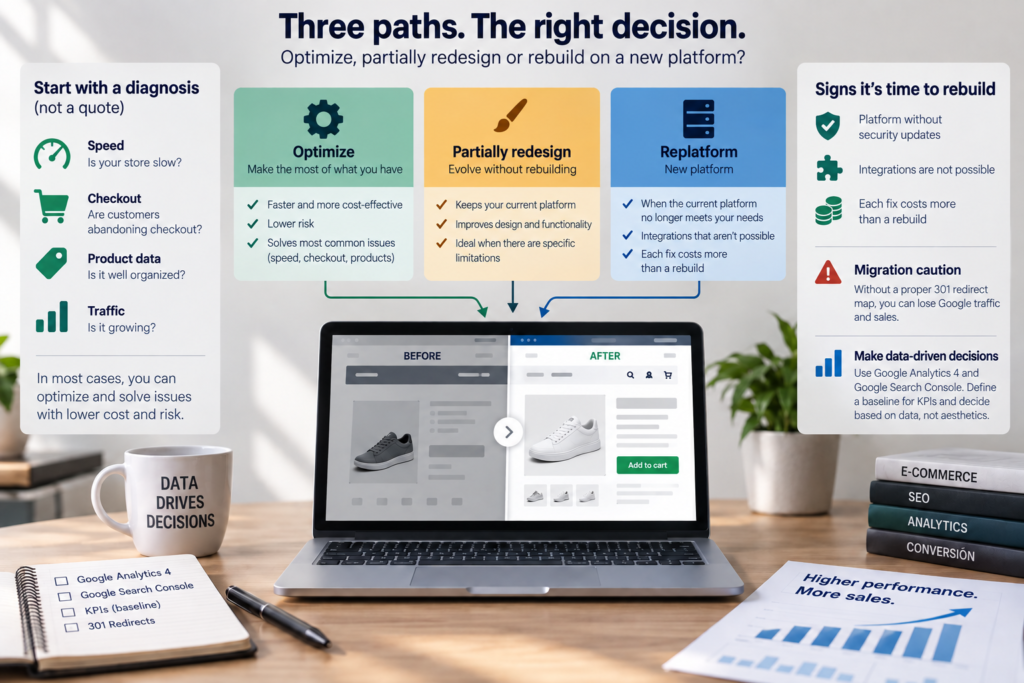
There are three paths, not two, and each solves a different problem. Confusing them is the root of most wasted ecommerce investment.
- Optimisation means fixing what already exists (speed, checkout, product pages, technical SEO, tracking) without changing platform or base design.
- Partial rebuild (redesign) means rebuilding the theme, templates or critical parts of the store while keeping the same platform, products, customers and order history.
- Replatforming means migrating products, customers, orders and page addresses (URLs) to a different technology, for example from an ageing or custom-built system to WooCommerce or Shopify.
The further down this list you go, the higher the cost, timeline and risk to sales. The practical rule is simple: always choose the lightest option that solves the real problem.
Signs your ecommerce site needs a redesign: is the problem the platform, the design or the traffic?
Before deciding, you need to know where sales are being lost. A store that sells too little can have three very different problems, and only one of them is solved by rebuilding.
When the problem is traffic: one of the first signs your ecommerce site needs a redesign
If too few qualified visitors arrive, a new website changes nothing. The causes are usually poorly targeted Google Ads or Meta Ads campaigns, weak SEO or heavy dependence on a single channel. Here the right investment is in acquisition, not in the site.
When the problem is conversion, another of the clear signs your ecommerce site needs a redesign
If visitors arrive but do not buy, the problem is the experience: slow pages, delivery costs that only appear at the end, a checkout with too many steps, thin product pages or a lack of trust signals. Almost all of this can be optimised on the current store.
When the problem is the platform: often the strongest of the signs your ecommerce site needs a redesign
If the store stops the business from growing, the problem is structural. Typical signs: the platform or critical plugins no longer receive updates, you cannot connect your ERP or accounting software, or selling into other European markets with different languages, currencies and VAT rules requires patched-together workarounds. Only here is replatforming often unavoidable.
Signs your ecommerce site needs a redesign: a 12-point checklist
This checklist groups the signs into four areas: performance, conversion, operations and platform risk. Score each question 0 (no), 1 (partly) or 2 (yes) and note which option it points to.
| Area | Question | If the answer is “yes”, it points to |
|---|---|---|
| Performance | 1. Do product and category pages fail Core Web Vitals in Google Search Console? | Optimise |
| Performance | 2. Is the store noticeably slow, especially on mobile? | Optimise |
| Performance | 3. Did organic traffic fall after technical changes or updates? | Optimise (technical SEO) |
| Conversion | 4. Are many baskets abandoned at checkout? | Optimise |
| Conversion | 5. Do product pages lack information, have weak photos or hide costs? | Optimise |
| Conversion | 6. Does the design no longer reflect your brand, price positioning or current customers? | Partial rebuild |
| Operations | 7. Are orders, stock or invoices moved manually between systems? | Partial rebuild or replatform |
| Operations | 8. Does any simple change (a banner, a new field) need a developer? | Partial rebuild |
| Operations | 9. Are there dozens of overlapping plugins and conflicts after every update? | Partial rebuild |
| Platform risk | 10. Have the platform, theme or critical plugins stopped receiving security updates? | Replatform |
| Platform risk | 11. Are essential integrations (ERP, accounting, marketplaces, payments) impossible on the current platform? | Replatform |
| Platform risk | 12. Can the store not support the languages, currencies or markets the business needs? | Replatform or partial rebuild |
How to read your score
- Any 2 in platform risk: replatforming needs serious evaluation, because optimisation cannot fix it.
- Points concentrated in performance and conversion: optimise first. It is the option with the fastest return and lowest risk.
- Points concentrated in operations: a partial rebuild (new theme, plugin clean-up, properly built integrations) is usually enough.
- High scores across all areas: a full rebuild is probably the most economical decision in the medium term, provided it is planned.
Optimise, partial rebuild or replatform: how do they compare?
The table below summarises what changes with each option. Timelines are relative, because they depend on the number of products, integrations and markets. Rather than quoting generic price ranges, it lists what actually drives ecommerce replatforming cost.
| Criterion | Optimise | Partial rebuild | Replatform |
|---|---|---|---|
| When to choose it | Slow store, weak checkout, technical SEO errors | Outdated design, plugin sprawl, hard to manage | Unsupported platform, impossible integrations, limits to growth |
| What drives the cost | Number of technical issues and pages to review | Number of templates, features and content to rebuild | Volume of data to migrate, integrations, languages and redirects |
| Timeline | Shortest, with improvements in phases | Medium | Longest |
| Risk to sales and SEO | Low | Medium, especially if URLs change | High without a migration plan |
| Cost of doing nothing | Lost sales from traffic you already pay for | Growing team hours and maintenance invoices | Security risk, operational failures and blocked growth |
When to replatform ecommerce: a 5-step method to decide without wasting budget once you spot the signs your ecommerce site needs a redesign
The safest way to decide is to follow a diagnostic sequence, from the cheapest thing to analyse to the most complex. Each step rules out hypotheses before any money is spent.
- Audit the data. In Google Analytics 4 and Google Search Console, check where traffic comes from, where visitors drop off and which pages have lost rankings. Without this baseline, any quote is a guess. Structured ecommerce data analysis and reporting turns this into clear evidence and helps you spot the signs your ecommerce site needs a redesign early, in line with recent ecommerce conversion rate benchmarks.
- Measure speed. Core Web Vitals are Google’s metrics for loading speed, responsiveness to clicks and visual stability of a page. Pages that fail them are usually a fix, not a reason to rebuild, though persistent failures are still one of the signs your ecommerce site needs a redesign. See this guide to reducing bounce rate for quick wins.
- Test the checkout and experience. Make a full purchase on a mobile phone as a new customer. Note every point of friction: forced account creation, long forms, missing payment methods, unclear delivery costs.
- Review the technology and integrations. List the platform version, theme, plugins and connections to ERP, accounting and carriers, and confirm which are still supported.
- Decide with a business case. Compare the cost of each option with the sales you expect to recover and the cost of keeping everything as it is. Choose the lightest option that solves the problems you found.
If you want a second opinion before requesting redesign quotes, you can book a free consultation and review your store data with us.
How do you redesign an ecommerce site without losing SEO once you spot the signs your ecommerce site needs a redesign?
You can lose rankings, but the risk is manageable. Traffic drops after a new store launches mainly happen when page addresses change without redirects, when content that attracted visitors is deleted or when the new version is slower.
A 301 redirect is an instruction that tells Google and browsers that a page has permanently moved, passing on visitors and accumulated relevance to the new address. For a safe migration, follow this checklist:
- URL inventory: export every current product, category and content page, including those that receive traffic or external links.
- 301 redirect map: each old URL points to the closest equivalent on the new store, never all to the homepage.
- KPI baseline: record organic traffic, conversion rate, revenue and key rankings before launch.
- Staging environment: a private copy of the store where everything, including payments and integrations, is tested before going live.
- Launch timing: avoid peak trading periods such as Black Friday, Christmas or your own campaign days.
- Post-launch monitoring: track errors and pages not found in Google Search Console during the following weeks, since a spike here can mirror the issues described in this case study on bounce rate after a website redesign.
For the technical side, technical SEO support during a site migration covers the redirect mapping, architecture and monitoring that protect organic traffic.
What if we invest and sales do not go up despite fixing the signs your ecommerce site needs a redesign?
This is the most common fear, and it often comes from a bad previous experience with an agency. Protection comes from the method, not the promise: diagnosis before a quote, a fixed scope and starting metrics agreed in writing.
Three safeguards reduce this risk:
- Insist on a baseline: without starting figures, nobody can prove whether the project worked.
- Work in phases: start with the highest-impact optimisations and only move to a redesign if the data justifies it.
- Own your assets: the domain, hosting, Google Analytics 4 and Google Search Console accounts and the code should be in your company’s name, so you are never locked in to a supplier.

Common mistakes when reading the signs your ecommerce site needs a redesign
- Deciding on visual appearance without looking at conversion data.
- Rebuilding the store to solve a traffic problem.
- Replatforming without mapping integrations and internal processes.
- Launching without a redirect map or KPI baseline.
- Accepting a quote without a detailed scope, which opens the door to time and cost overruns.
- Leaving out the people who manage orders, stock and customer service.
- Forgetting market requirements such as GDPR-compliant cookie consent, multi-currency pricing or cross-border VAT when selling across Europe.
How onOrbit Marketing can help once you spot the signs your ecommerce site needs a redesign
onOrbit Marketing is a Portugal-based agency working with companies across the UK and Europe, with an English-speaking team in the same time zone as the UK. We start with Diagnosis: we analyse Google Analytics 4, Google Search Console, speed, checkout and technology to identify where your store is losing sales. In the Strategy phase, you receive a clear recommendation to optimise, partially rebuild or replatform, including advice not to rebuild when that is the right call.
During Implementation, our web development team works in WordPress and WooCommerce, with a redirect map, staging and a KPI baseline to protect sales and SEO. In Optimisation, we track results through SEO, paid traffic and continuous conversion improvement. You get a defined scope, starting metrics and digital assets held in your own company’s name.
Frequently asked questions
How long does an ecommerce website redesign take?
It depends on the number of products, integrations, languages and markets involved. Optimisation can move forward in phases within a few weeks, while a replatform with data migration and ERP or accounting integrations takes considerably longer. A realistic timeline can only be set after a technical inventory. Be wary of fixed deadlines offered before anyone has analysed your current store and internal processes.
Can I move my store from WooCommerce to Shopify, or the other way round?
Yes, migrating between WooCommerce and Shopify is possible. Products, customers and orders can be transferred, but you need to check what does not move automatically: extensions, pricing rules, integrations and URL structure. The choice should follow business needs, such as integrations, technical control and recurring costs, rather than a preference for one platform. A 301 redirect plan is essential either way.
What determines ecommerce replatforming cost?
Cost is driven mainly by five factors: the number of templates and features to design, the volume of data to migrate, integrations with ERP, accounting, carriers and marketplaces, the number of languages and markets, and the SEO work needed during migration. A serious quote should break down each of these. If you only receive a single total figure, ask for the written scope before deciding.
Do I need to close my store during the migration?
It should not be necessary. The new store is built and tested in a staging environment while the current one keeps selling. The switch happens at a low-traffic moment, with a final sync of orders and stock. A good launch plan keeps disruption to a minimum and includes a way to roll back if something critical fails, so customers can keep ordering throughout.
Who in the company should be involved in the redesign decision?
Beyond the leadership team, involve the people who use the store every day: those managing orders, stock, invoicing and customer service. They know the manual processes, recurring errors and integrations the business depends on. Ignoring them leads to attractive stores that complicate operations. The commercial or marketing director should set the objectives and the KPIs used to judge success.
Before you rebuild your store, find out what is really holding sales back
In a free consultation, we review your store data, speed, checkout and technology with you, and tell you honestly whether it pays to optimise, partially rebuild or replatform. No commitment and no blind quotes.

Alona Stepanova
CEO of onOrbit Marketing | Web Developer & Specialist in E-commerce Growth. Helps SMEs and online stores in Portugal and across Europe grow with web development, SEO, GEO and digital marketing.