
Summary
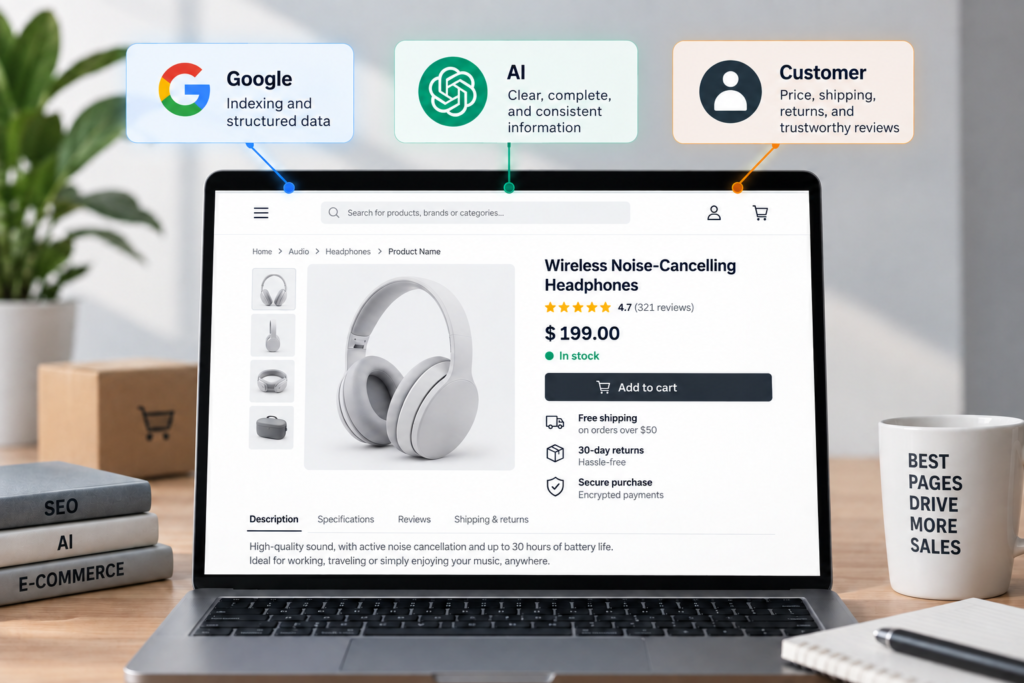
Product page optimisation means serving three readers at once: Google, which needs an indexable page with structured data; AI tools, which need clear, complete and consistent facts they can cite; and the customer, who needs price, delivery costs, returns and trust signals to buy without hesitating. All three reward specific, unique, accurate information.
- Every product page has three readers: Google, AI tools and the customer. All three reward clear, complete and consistent information.
- Supplier-copied descriptions, missing product schema and hidden delivery and returns information are the most common reasons product pages fail to sell.
- Out-of-stock products and variants need different decisions: keep, redirect or remove, depending on the case.
- In large catalogues, prioritise by revenue × traffic × margin and optimise in batches, measuring before and after.
- In the EU, sale prices and reviews are regulated by the Omnibus Directive; UK retailers have their own consumer protection rules.
Getting traffic to your product pages but few sales? Product page optimisation means serving three readers at once: Google, which needs to understand and index the page; AI tools, which need clear facts to cite the product; and the customer, who needs enough confidence to buy without hesitating. Fix all three and the same page earns free traffic and converts it.
The symptoms are familiar. Visitors arrive, but the basket stays empty. Or your products don’t show up in Google at all, and the marketplace or big retailer selling the same item takes the click. This costs real money: every sale that could have come from free search now needs Google Ads spend, and part of your margin goes to marketplace fees.
This guide sets out a practical method we call ‘One page, three readers’, with an element-by-element table, a decision tree for out-of-stock products and variants, and a way to prioritise large catalogues without rewriting everything at once. Whether you search for product page optimisation or optimization, the principles are the same.
Why isn’t product page optimisation working for your store?
In most online shops, product pages don’t sell because they were built to ‘get the product on the site’, not to answer the questions of people who search and people who buy. It is rarely one big problem; it is lots of small gaps repeated across hundreds of pages.
Use this checklist for a quick self-diagnosis. If you answer ‘yes’ to three or more, your pages are losing sales:
- Descriptions are copied from the supplier and identical to other retailers’ pages.
- The product title is an internal code or reference nobody searches for.
- Delivery costs, delivery times and returns terms only appear at checkout, undermining product page optimisation and causing hesitation, as product page conversion research shows.
- There are no customer reviews, or they are buried at the bottom of the page.
- Photos are few, small or only the manufacturer’s catalogue shots.
- The page is slow to load on a mobile phone.
- Out-of-stock products vanish from the site and leave 404 errors.
- Every colour or size has its own near-identical page, with no clear logic.
- You have never checked in Google Search Console how many product pages are actually indexed.
If several of these apply across the whole shop, the issue is often structural rather than page by page; our e-commerce solutions look at the catalogue, platform and checkout together.
How does product page optimisation work for Google, AI and customers?
Product page optimisation is the process of making sure every element on the page serves the search engine, AI tools and the buyer at the same time. The good news is that their needs largely overlap: all three reward information that is clear, complete, specific and consistent.
| Page element | What Google needs | What AI tools need | What the customer needs |
|---|---|---|---|
| Title and H1 | Terms people actually search for | An unambiguous name: brand, model, key attribute | To know instantly it is the right product |
| Description | Unique, non-duplicated text | Concrete, comparable facts | Benefits, use cases and who it is for |
| Specifications | Structured attributes | Precise data (dimensions, materials, compatibility) | Answers to technical questions |
| Images and video | Lightweight files with alt text | Descriptive context for each image | To see the product in detail and in use |
| Price, delivery and stock | Offer structured data | Current information that matches the product feed | Total cost and delivery time with no surprises |
| Reviews | User-generated content | Reputation signals and real experiences | Social proof before paying |
| Product FAQ | Answers to long-tail searches | Short, quotable passages | Fewer doubts, fewer returns |
| Structured data | Eligibility for rich results | Reliable reading of price, stock and ratings | (invisible, but shows stars and price in Google) |
| Page speed | Core Web Vitals | An accessible, crawlable page | Not giving up before seeing the product |
What should a product title and H1 include?
A product title should include the product type, the brand or model and the attribute that matters most to the buying decision (size, material, capacity). ‘Waterproof 30L backpack for 15-inch laptop’ is searchable and clear; ‘Ref. MX-3021’ is not. Keep the on-page H1 consistent with the SEO title.
Can I use the supplier’s product description?
You can, but you shouldn’t stop there. If ten shops publish the same text, Google has no reason to choose yours, and AI tools find nothing distinctive to cite. Good product description SEO uses the supplier’s technical data as a base and adds what only your business knows: who the product suits, where it works best, the questions your customers actually ask and how it compares with alternatives in your range.
What information reduces returns and hesitation?
The information that reduces returns is the information that removes wrong expectations: real dimensions, size guides, materials, compatibility and photos that show scale. Delivery costs, delivery times and the returns policy should sit next to the add-to-basket button, not in the footer or at checkout. This is the core of product page conversion rate optimisation: removing the reasons to leave.
Pricing and reviews are also regulated. In the EU, Directive (EU) 2019/2161, known as the Omnibus Directive, requires a price reduction to show the prior reference price, and requires shops to state whether and how they check that reviews come from genuine customers. The UK has its own framework, including the Digital Markets, Competition and Consumers Act 2024, which targets fake reviews and misleading pricing. Beyond avoiding fines, compliance builds buyer trust. Check the details for each market with your legal adviser.
Which product schema do I need?
Structured data is code, invisible to visitors, that describes the product to Google in a standard format (schema.org). For an online shop, the essentials are Product with its offer (Offer: price, currency, availability), aggregate ratings where you have them, and shipping and returns details. Google Search Central’s documentation on product and merchant listing structured data lists the required and recommended fields.
In WooCommerce, the platform and SEO plugins generate part of this code, but often with missing fields or wrong values. It is worth validating a sample of pages with Google’s Rich Results Test.
How fast does a product page need to load?
A product page needs to be fast enough for the customer to see the product and price without waiting, especially on mobile. Google measures this with Core Web Vitals, a set of metrics for loading speed, responsiveness and visual stability. Heavy images, too many plugins and bloated themes are the usual culprits in WooCommerce, and fixing them is typically a web development job rather than a content one.
If you want to know which pages in your catalogue are losing sales and why, you can book a free product page diagnosis with our team.
What should you do with out-of-stock products and variants in product page optimisation?
When a product goes out of stock, the general rule is not to delete the page: it has built up visibility in Google and links that are lost with a 404 error. The right decision depends on whether the product will return and whether there is a replacement.
| Situation | Recommended action | Why |
|---|---|---|
| Temporarily out of stock | Keep the page, mark it ‘out of stock’ in structured data, show the expected date, alternatives and a back-in-stock email alert | Preserves rankings and captures demand |
| Discontinued, with a direct replacement | 301 redirect to the new model | Passes visibility to a page that sells |
| Discontinued, no replacement, but has traffic or links | Keep as an information page with alternatives, or redirect to the closest category | Avoids losing visits and external links |
| Discontinued, no traffic or links | Remove (404 or 410 status) | Keeps the catalogue clean at no real cost |
Back-in-stock alerts collect email addresses, so under the GDPR the sign-up should state clearly what the customer will receive and not bundle in marketing consent by default.
For variants (size, colour), the question is whether people search for the variant on its own. If many people search for ‘grey 3-seater sofa’, that variant may deserve its own URL and content. Otherwise, a single page with a selector avoids dozens of near-duplicate pages. Either way, Google documents how to mark up variants with structured data (ProductGroup), and the canonical tag should point consistently to the main version.
How do you optimise product pages for AI search?
There is no secret trick for AI: Google Search Central’s guidance on AI features states that standard SEO best practices remain the foundation for appearing in AI Overviews and AI Mode. Indexable pages, genuinely useful text and correct structured data serve both traditional search and AI answers.
In practice, AI tools such as ChatGPT, Perplexity, Copilot and Google’s AI features favour pages that answer questions directly and factually. Three actions help:
- Quotable passages: short sentences that answer a question (‘This backpack fits laptops up to 15 inches and is rainproof’).
- A product FAQ: three to five real questions customers ask your support team or by email.
- Consistent data: the same price, stock and name on the site, in structured data and in the Google Merchant Center feed, the platform that powers Google Shopping, including its free listings, a key part of product page optimisation for AI search.
Where should you start with a catalogue of hundreds of products?
Start with the products that matter most to the business, not at the top of the catalogue. Rewriting everything at once exhausts the team and dilutes the impact. The method we recommend ranks products by revenue × traffic × margin:
- Export the data: sales and margin per product (WooCommerce or your ERP), impressions and clicks (Google Search Console) and sessions (Google Analytics 4).
- Score each product: give revenue, traffic and margin a score from 1 to 3, then multiply them.
- Pick a small first batch with the highest scores, plus products with many impressions but few clicks or sales.
- Build templates per category: reusable title structures, description blocks, FAQs and specification tables, so you can scale without starting from scratch.
- Fix what is site-wide: structured data, page speed and delivery information affect every page at once, making them priorities in product page optimisation.
- Measure and repeat: compare the optimised batch with the previous period before moving to the next.
What if changing your product page optimisation hurts sales?
The risk is real when everything changes at once without measurement; you control it by working in batches, with backups and a staging environment before anything goes live. URLs never change without redirects, and every change is logged so it can be reversed.
Set your KPIs before you start: impressions and clicks in Search Console, add-to-basket rate, conversion rate and organic revenue per product. Conversion improvements (visible delivery costs, better photos) tend to show sooner; ranking gains depend on Google recrawling the pages and take longer.
Common mistakes to avoid
- Stuffing titles and descriptions with keywords until they become unreadable.
- Optimising products that neither sell nor have search demand.
- Deleting out-of-stock products without a redirect.
- Showing different prices on the site and in the Merchant Center feed.
- Running several SEO plugins at once, producing duplicate structured data.
How onOrbit Marketing can help with product page optimisation
onOrbit Marketing is a Portugal-based agency working with online shops across Europe, with an English-speaking team in the same time zone as the UK. We improve product pages by combining SEO, GEO, AEO and AIO, conversion optimisation and WooCommerce development, using our four-step process:
- Diagnosis: a product page audit covering indexing, structured data, speed, content and conversion, cross-checked with your sales and margin data.
- Strategy: prioritisation by revenue, traffic and margin, with KPIs agreed before touching the site.
- Implementation: category templates, WooCommerce technical fixes and alignment with Google Merchant Center and EU or UK pricing and review rules.
- Optimisation: batch-by-batch measurement and ongoing adjustments.
You get a prioritised plan, documented changes and reports built on business metrics, not just Google rankings.
Frequently asked questions
How much does a product page audit cost?
The cost depends on catalogue size, platform and how deep the analysis goes. An audit focused on your priority products is faster and cheaper than reviewing the entire catalogue. The sensible approach is to start with a diagnosis that shows where most sales are being lost, then decide how much to invest based on that. At onOrbit Marketing, the first diagnosis is free and comes with no obligation.
How long does it take to see results from product page SEO?
It depends on the type of change. Conversion improvements, such as showing delivery costs next to the buy button or upgrading photos, can affect sales soon after going live. Organic ranking gains take longer, because Google has to recrawl and reassess the pages. That is why it pays to work in batches and always compare results against the previous period.
Can products appear in Google Shopping for free?
Yes. Through Google Merchant Center, shops can submit a product feed and become eligible for free listings in the Shopping tab and other Google surfaces, without paying per click. The feed must have prices, stock and product data that match the website, and the shop must comply with Merchant Center policies. Paid Shopping ads remain an optional complement for extra reach.
How many images should a product page have?
There is no magic number, but images should answer the questions a customer would have with the product in their hands: an overall view, close-up details, scale, the product in use and each colour variant. A short video helps with technical or higher-value products. Every image should be compressed so it doesn’t slow the page, and have descriptive alt text.
Which SEO plugin should I use for WooCommerce product pages?
The most popular WordPress SEO plugins generate titles, meta descriptions and part of the product structured data, and some offer WooCommerce-specific extensions. More important than which one you choose is using only one, avoiding duplicate structured data from your theme, and validating a sample of product pages with Google’s Rich Results Test after any change.
Do I need separate product pages for each European market?
If you sell in several countries, localised pages improve your chances of ranking in local searches and of converting visitors. Translation alone is not enough: adjust delivery costs, delivery times, currency, the terms people search for and each country’s legal information. Use hreflang tags to tell Google which language and country each version targets, which avoids duplicate content issues.
Find out which product pages are losing you sales
In a free consultation, we review a sample of your product pages, identify the products with the highest revenue potential and show you where to start, with clear priorities and no obligation.

Alona Stepanova
CEO of onOrbit Marketing | Web Developer & Specialist in E-commerce Growth. Helps SMEs and online stores in Portugal and across Europe grow with web development, SEO, GEO and digital marketing.